
Date:
2 avril 2026
 IA
IA
Artificial intelligence is everywhere in 2026. Businesses are using AI to write content, summarize documents, answer customer questions, analyze data, and automate repetitive work. But there is one big challenge: AI on its own is not enough.
If you only use AI inside a chatbot window, you are still doing most of the work manually. You ask a question, copy the result, paste it somewhere else, then move to another tool. That is useful, but it is not a real system.
This is where n8n + AI becomes powerful.
When you connect AI to n8n, you move from “using AI sometimes” to building real automated workflows. Instead of manually moving information from one app to another, you can create processes where AI receives data, makes decisions, generates outputs, and triggers the next action automatically.
That is why more marketers, founders, agencies, and creators are asking the same question: How does n8n + AI actually work in practice?
In this guide, we will break it down in simple terms, show real use cases, and explain why this combination is becoming one of the most practical ways to build AI-powered automation.
At a basic level, n8n is a workflow automation platform. It connects apps, APIs, databases, and services into automated processes. You build workflows visually using triggers and nodes.
AI, in this context, usually means using tools like language models, AI APIs, classifiers, summarizers, or other intelligent services inside that workflow.
So when people say n8n + AI, they mean:
In simple words:
n8n is the automation engine, and AI is the intelligence layer.
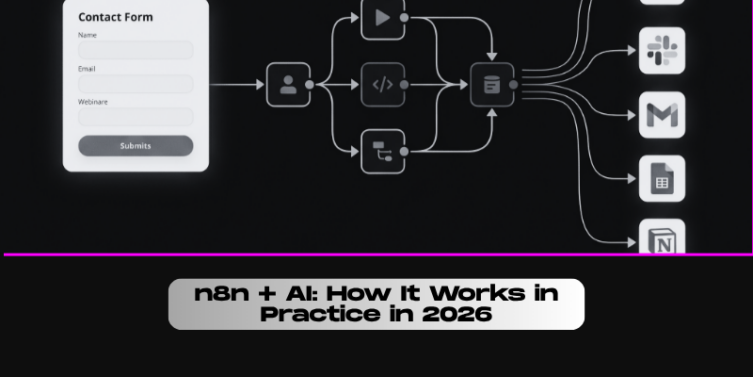
A website receives a new contact form submission. n8n sends the message to an AI model to detect if the lead is interested in web design, SEO, or automation services. Then the workflow automatically sends the lead to the right sales pipeline in the CRM.
Using AI alone can save time. But using AI inside a workflow can save much more time because it removes the manual steps around it.
Without n8n, a typical process might look like this:
1- Open email
2- Read the message
3- Copy the content
4- Paste it into an AI tool
5- Ask for a summary or reply
6- Copy the result
7- Paste it into another tool
8- Send or save it manually
With n8n + AI, the system can do most of that automatically.
This is why the combination is so useful: it transforms AI from a “smart assistant” into part of a repeatable business workflow.
A support team receives dozens of emails per day. Instead of reading each one manually, n8n sends each email to AI for categorization (billing, technical issue, cancellation, urgent complaint), then routes it to the correct team automatically.
To understand how it works in practice, think of every workflow as having four simple layers.
The workflow starts when something happens.
Examples:
n8n captures the data from the source.
This can include:
This is where AI steps in.
The AI can:
After AI produces an output, n8n uses that result to take action.
Examples:
A company uploads a PDF invoice. n8n extracts the text, sends it to AI to identify supplier, amount, and category, then saves the structured data in a finance sheet and alerts the accounting team.
One of the easiest ways to understand this combination is through content creation.
Imagine a content team that wants to publish blog articles faster.
A practical workflow can look like this:
This does not replace human strategy, but it removes repetitive research and drafting work.
A digital marketing agency can automatically collect trending SEO news, ask AI to summarize the key updates, generate 3 blog angle ideas, and send the final suggestions to the editorial team every morning.
Sales is another powerful area for n8n + AI.
Many businesses get leads, but not every lead is equally valuable. Some are ready to buy, others are just browsing, and some are not a fit at all.
With AI inside n8n, you can build a workflow that:
A web agency receives 20 leads per week. Instead of reviewing them manually, n8n + AI qualifies each lead based on budget, urgency, and requested service, then prioritizes the hottest leads automatically.
Customer support is one of the most practical use cases because it combines volume, repetition, and urgency.
With n8n + AI, businesses can:
This does not mean AI replaces human support agents. It means support teams work faster and with better organization.
An e-commerce brand can automatically detect refund requests, summarize the order issue, and send the ticket directly to the returns team while also generating a first reply draft for the customer.
There are many automation tools, but n8n stands out for AI because it is flexible.
Here is why:
AI outputs are not always simple. Sometimes you need conditions, filters, or branching paths based on what the AI says. n8n is good at that.
Many AI tools are API-based. n8n is comfortable in that environment.
If you want deeper customization, n8n gives you more room to grow.
It is not just about “send message from app A to app B.” It can orchestrate multi-step business processes.
A SaaS startup can build a full onboarding assistant where user signup triggers AI-generated onboarding emails, help center recommendations, task creation, and product team notifications.
One important thing to understand: AI does not automatically create a good workflow.
Many people think that once AI is added, everything becomes smart instantly. In reality, the best results come from:
n8n gives you the framework, but you still need to design the process properly.
A business may ask AI to generate social media posts automatically, but without approval steps, brand rules, and content filters, the workflow can create low-quality results. A better workflow includes AI generation plus human validation before publishing.
In 2026, the winning businesses are not just the ones that “use AI.” They are the ones that embed AI into their operations.
That is the real difference.
When AI is connected to your forms, CRM, support inbox, content system, reports, and internal tools, it stops being a novelty and becomes a business asset.
That is why n8n + AI matters so much right now. It gives teams a practical way to build systems that are:
A small two-person agency can use n8n + AI to automate prospecting, content ideation, lead sorting, reporting, and client follow-up — allowing them to operate like a much larger team.
If you want to understand n8n + AI in practice, the easiest way to remember it is this:
n8n moves the data. AI adds the intelligence. Together, they create real automation.
That is why this combination is becoming so important in 2026.
Instead of using AI in isolated moments, businesses can now build connected workflows where AI reads, analyzes, writes, decides, and triggers actions automatically. Whether you are a marketer, founder, freelancer, or agency owner, this opens the door to smarter operations and better productivity.
The future of AI is not just chat.
The future of AI is workflow-driven intelligence.
And n8n is one of the best tools to make that real.